
 Accessibility is the measure of how many differently skilled/abled types of people (including individuals with disabilities) in varying locations (e.g. mobile web) can make use of a given product. There exist many, very thorough, guidelines for determining the degree to which a product adheres to accepted accessibility standards. However, many can be very complex and time-consuming, also requiring the study of a good deal of the underlying code — much of which goes against the goals of the ‘quick’ part of Quick-UX.
Quick-UX
Quick-UX provides for the rapid, simple and quantifiable assessment of a product’s User Experience (UX). In answering the question of Usability, "Should I use it?" the sub-category of Accessibility represents one of the more complex components.
Today, we will look at the first of 3 examples of products with Moderate Accessibility – a Quick-UX Accessibility value between 0.4 (inclusive) and 0.6.
Moderate Accessibility
For this set of products, I chose ones that either encouraged or required reading as the primary function of the product. This is a category that begs for a clear attention to the Accessibility needs of their varied user bases.
Example: Borders
Here we look at Borders’ online product, a marketplace for the selling of books, music, movies, etc.

Borders’ received the following results from FAE…
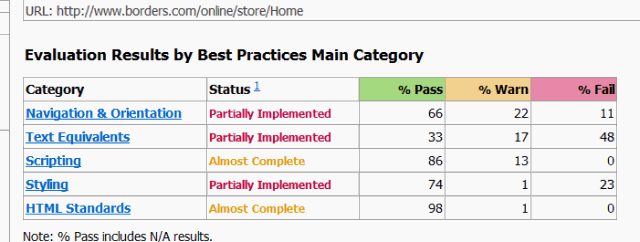
…resulting in an Accessibility variable value of 0.428, Moderate Accessibility.
Should Do
Navigation & Orientation
- Web pages should have only 1 title element, unlike that found, for example on some of the Borders’ pages.

- Make sure that when using <H#> tags on a page, there is always at least one <H1>. Since the <H1> tag is generally the page title, it is strongly discouraged to exceed the use of more than two (and penalized by FAE).
- Insert text content, not merely an image with an ALT attribute, into the page headings like this one…
<h2><img src="/wcsstore/ConsumerDirectStorefrontAssetStore/images/content/logo_print.gif" alt="Borders logo" border="0" /></h2>
- List elements should be clearly incorporated into that of the overall page hierarchy for clarity and navigation. Each list element that is part of the navigation region of the page should be preceded with an <H#> element.
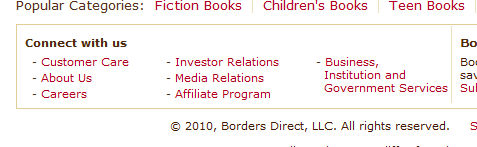
- Each area element should have a redundant text link with matching href.
- When it comes to images, it is always important to provide the image ALT or TITLE text – especially for those who cannot see it/them.
Quick & Usable
Over the next few weeks I will continue exploring the ins-and-outs of a variety of products, and walking through real-world examples of the Quick-UX evaluation of Accessibility…
Comprehensive Accessibility [RoundHouse & FAE]
Nearly Comprehensive Accessibility [UseIt & Eboy]
Moderate Accessibility [Borders, Bloomberg & NY1]
Fair Accessibility [CNET & Drudge Report & NBC NY]
Poor Accessibility [GoodReads & Barnes and Noble]
Subscribe now (click here) to make sure you don’t miss any part of this series exploring the Usefulness and Credibility components of Quick-UX, the quick and easy method of generating quantifiable and comparable metrics representing the understanding of the overall User Experience of a product, as well as other insightful posts from The Product Guy.
Enjoy!
Jeremy Horn
The Product Guy
 The Product Guy